Due: Tuesday, May 12 at 5:00 pm
Welcome to the CS107E shell.
Remember to type on your PS/2 keyboard!
Pi> help
   help [cmd]               print command usage and description
   echo [args]              print arguments
   reboot                   reboot the Mango Pi
   clear                    clear screen (if your terminal supports it)
   peek [addr]              print contents of memory at address
   poke [addr] [val]        store value into memory at address
Pi> help reboot
   reboot                   reboot the Mango Pi
Pi> echo cs107e rocks my sox
cs107e rocks my sox
Pi> echo I can use poke to turn on and off the blue LED!
I can use poke to turn on and off the blue LED!
Pi> poke 0x20000a0 0x40000
Pi> poke 0x20000a0 0
Goals
For this week’s assignment, you will implement a PS/2 keyboard driver and implement a simple command-line shell. You will then be able to type commands and execute them on your Pi. Neat!
In completing this assignment you will have:
- written code that interfaces with an input device. When you next download a device driver, you will think "I have a decent idea how that code operates",
- seen the design of a complex interface into hierarchical levels and appreciated its benefits,
- implemented a simple command-line interpreter, and
- explored the use of C function pointers for callbacks and command dispatch.
This is a fun assignment, and brings us back to using physical devices and making them do cool things. These additions are the first steps toward turning your humble Mango Pi into a standalone personal computer.
Get starter files
Change to your local mycode repo and pull in the assignment starter code:
$ cd ~/cs107e_home/mycode
$ git checkout dev
$ git pull code-mirror assign5-starter
In the assign5 directory, you will find these files:
ps2.c,keyboard.c,shell.c: library modulestest_keyboard_shell.c: test program with your unit testsuart_shell.c: application program that runs your shell, reading input from the PS/2 keyboard and printing output to the uart. You will use this program unchanged.extension.c: Edit this file to implement extension (if you choose)Makefile: rules to build uart_shell application (make run) and unit test program (make test)README.md: edit this text file to communicate with us about your submissionstyle_reflection.txt: a text file that you will edit for your responses to the style reflection prompts
The make run target builds and runs the sample application
uart_shell.bin. You can use this target to test the full integration of
your ps2, keyboard, and shell modules. The make test target builds and run
the test program test_keyboard_shell.bin. This test program is where
you will add all of your unit tests. You will make heavy use of this target
throughout your development. Assign 5 has no make debug target because the gdb simulator
does not emulate hardware peripherals; no gpio and timer means no keyboard driver.
You can edit MY_MODULE_SOURCES in the Makefile to choose which modules of yours to build on. (See instructions for use of MY_MODULE_SOURCES in assignment 3.) The ps2 module strongly depends on gpio. If you are using your gpio.c, be sure it is in tip-top shape (including function gpio_set_pullup if you implemented it).
Core functionality
PS/2 Keyboard driver
1) Review interface (ps2.h and keyboard.h)
The PS/2 keyboard driver is divided over the two modules ps2 and keyboard.
Start by reviewing the header files (available in $CS107E/include or browse
here). The functions of the ps2 module are:
ps2_device_t *ps2_new(gpio_id_t clock_gpio, gpio_id_t data_gpio)uint8_t ps2_read(ps2_device_t *dev)
And keyboard functions:
void keyboard_init(gpio_id_t clock_gpio, gpio_id_t data_gpio)char keyboard_read_next(void)key_event_t keyboard_read_event(void)key_action_t keyboard_read_sequence(void)uint8_t keyboard_read_scancode(void)
The design of the keyboard driver is worth a pause to understand and
appreciate. All of the nitty-gritty low-level protocol details are encapsulated
within the ps2 module. The keyboard module layers on that to implement the
logic to process scancodes into key actions, events, and eventually typed characters. Within
the keyboard module, the functionality is arranged hierarchically, each routine
building on the next. The bottom level routine reads a raw scancode (by
delegating to the ps2 module), the next level gathers a sequence of scancodes
into one logical key action, the higher level routines translate actions
into key events and typed characters.
The layered interface cleanly supports the needs of different clients. A client
that simply wants typed characters might use only the top level
keyboard_read_next; a client that reacts to each key press and release would instead access
the mid level keyboard_read_event.
The hierarchical design also eases the job of the implementer. Each level focuses on a discrete part of the operation and delegates tasks above and below to other functions. This makes each function simpler to implement and test. Your implementation plan of attack is to start at the bottom and work your way upward.
2) Read and validate scancodes (ps2 module)
The ps2 module encapsulates functionality for interacting with a PS/2 device.
Read over the ps2.h header file. The ps2.c module has only two functions: ps2_new and ps2_read.
Review the given code for the ps2_new function in the ps.c file. Take care to understand how it
initializes the device and configures the gpio pins.
The struct ps2_device tracks the state
associated with a single PS/2 device. The struct as defined in the starter code has
just two fields (ids for the clock and data gpios). If you later encounter a need to track
additional state, simply add more fields to the struct definition and initialize those fields in ps2_new.
In lab 5, you got a start on implementing ps2_read function. Copy that work
into ps2.c now. The entire PS/2 protocol rests on this cornerstone, so your
first task is to finish it off and ensure it is reliable and robust.
A PS/2 scancode is an 11-bit packet organized in 8-odd-1 format. The first bit,
the start bit, is low. The next 8 bits are data bits, least significant bit
first. The following bit is a parity bit. The PS/2 protocol uses odd parity,
which means that there should be an odd count of on bits in the data and parity
bits. The 11th and final bit is the stop bit, which is always high.
The return value from ps2_read is the 8 data bits, represented using the type uint8_t.
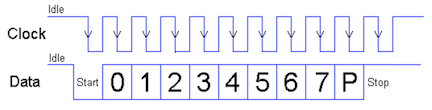
The first test in test_keyboard_shell.c will read and echo scancodes as read by the keyboard. Use
this test to verify this basic part of your keyboard driver.
Timing is everything! The timing of the PS/2 protocol has to be strictly followed. The keyboard sends the bits of the scancode one after another in tight sequence and your driver has to observe each bit as it arrives. Once your driver sees the falling clock edge for the start bit, it needs to stay on task to read each subsequent bit. There is not time between clock edges to complete a call to a complex function like
printf. Save any debug printing until after you have finished reading the entire scancode.
Error handling in ps2_read
The ps2_read function reads one well-formed scancode.
"Well-formed" means that the start, parity, and stop bit each have valid values.
If ps2_read encounters an invalid bit, it should abandon
the partial scancode and retry, treating the bit as the start of a new scancode. Discard as many invalid attempts as necessary, only returning when a full valid scancode is received.
In a similar vein, a dropped bit or discarded partial read could cause your driver to become de-synchronized. If the driver attempts to gather a scancode starting mid-packet, it can get stuck waiting for further bits
to arrive that aren't forthcoming or wrongly mash together bits from two different scancodes. Your driver should implement a timeout reset that detects when the gap between bits is too long for them to have been part of the same scancode. Given the PS/2 bit rate of 10-16Khz, the expected gap between bits should be in the range 60-100us. Call your timer_get_ticks function to get a timestamp for each clock edge. If you detect that this clock edge occurred more than 500us after the previous timestamp, reset the scancode state and assume the current clock edge is for the start bit of a new scancode. This small effort provides additional robustness in your driver to combat flaky connections and hardware blips.
It can be challenging to directly test your error-handling and resynchronization. One way to generate a malformed or interrupted scancode is by disconnecting the clock or data line in middle of typing. After reconnect, your driver should immediately resynchronize (due to long gap) and correctly read the next new scancode. Another approach is to plant an intentional mis-read within your code. Use a known trigger for the forced error, perhaps every 100th scancode read or when receiving the scancode for a certain key. The forced error can be something like an early return after reading the first 9 bits, leaving the remaining 2 bits to be picked up as the start of the next read where they will be wrongly mashed together with other bits belonging to the following scancode. It may have to swallow a few of these jumbled-up scancodes as it retries, but should fairly quickly resynchronize on the correct start bit and successfully read further scancodes.
3) Gather sequence into key action (keyboard_read_sequence)
The next level function keyboard_read_sequence in keyboard.c gathers a sequence of
scancodes into one logical key action. A key action is the press or release of
a single key.
When you press a key, the PS/2 keyboard sends the scancode for that key. When
you release the key, it sends a two-byte sequence: 0xF0 (the "break" code)
followed by the key's scancode. For example, typing z will cause the keyboard
to send 0x1A and releasing z will cause the keyboard to send 0xF0,
0x1A.
The press or release of an extended key sends a sequence with the extra byte
0xE0 inserted at the front. For example, pressing the right Control key sends
the sequence 0xE0, 0x14 and releasing sends 0xE0, 0xF0, 0x14.
Review keyboard.h for the description of the function keyboard_read_sequence and the definition of the type key_action_t. Implement the function to read the sequence (1, 2 or 3 scancodes
depending on context) and translate it into a key_action_t struct which
reports the type of action and which key was involved.
Use the test in test_keyboard_shell.c that reads sequences to verify the
operation of this function before moving on.
4) Process key events (keyboard_read_event)
The mid level routine keyboard_read_event processes key actions into key
events. It calls keyboard_read_sequence to get a key_action_t and packages
the action into a key_event_t struct which includes the state of keyboard
modifiers and the PS/2 key that was acted upon.
There are some additional types and constants used by this function. Review keyboard.h for the definitions of keyboard_modifiers_t and key_event_t and ps2_keys.h for
the definition of ps2_key_t and keycode constants.
The modifiers field of a key_event_t reports which modifier keys are in
effect. The state of all modifier keys is compactly represented using a bit
set. The keyboard_modifiers_t enumeration type designates a particular bit
for each modifier key. If a certain bit is set in modifiers, this indicates the
corresponding modifier key is currently held down or in the active state. If
the bit is clear, it indicates the modifier is inactive.
The PS/2 protocol does not provide a way to ask the keyboard which modifiers
are active, instead your driver itself must track the modifier state. A simple
approach is a module-level static variable in your keyboard module that you update in
response to modifier key actions. The Shift, Control, and Alt modifiers are
active if and only if the corresponding modifier key is currently held down.
Caps Lock operates differently in that its setting is "sticky". A press of the
Caps Lock key makes the modifier active and that state persists even after
releasing the key. A subsequent press of Caps Lock inverts the state of the modifier.
The ps2_keys module provides a function ps2_key_for_scancode that returns the ps2_key_t struct
associated with a given scancode. Review source file $CS107E/src/ps2_keys.c ( ps2_keys.c) to see the
how the key map is organized. It defines a static array of structs indexed by scancode. The array is sparsely populated by
providing entries only for valid scancodes, any index not listed will be zero-filled.
Review keyboard.h for the description of the function keyboard_read_event. Implement the function as described. Use the functions in test_keyboard_shell.c to verify your processing of key
events before moving on.
5) Produce typed char (keyboard_read_next)
You are now ready to implement the final top-level routine
keyboard_read_next that translates a key press event into a typed character.
The keyboard diagram below shows which keys your keyboard driver is required to handle. Keys not shown in this diagram, e.g. numeric keypad, arrow keys, home, scroll lock, etc., are not required.
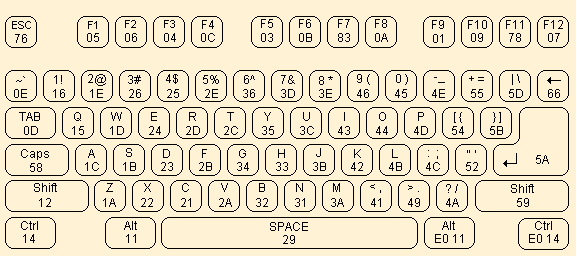
Most of the keys are ordinary character keys. Typing a character key produces its associated ASCII character. The character keys are:
- All letters, digits, and punctuation keys
- Whitespace (Space, Tab, Return)
- Backspace (Delete,←,⌫) produces
'\b'(ASCII backspace)
The fields ch and ch_shifted of the ps2_key_t struct
are the normal and shifted character produced by the key. The
A key produces 'a' and shifted 'A'. The Four key produces '4' and shifted '$'.
Keys such as Tab that are unchanged by shift use same character
for both '\t'.
There are thirteen non-character special keys. Typing a special key produces its id. These ids are greater than 0x90 to distinguish from ASCII values. The special keys are:
- Escape
- Function keys F1-F12
In the ps2_key_t struct for a non-character key, both character fields are zero to indicate they are unused and the id field is the key's enumerated value from the list in ps2_keys.h.
There are four modifier keys. Press and release of a modifier key changes the modifier state but these actions do not produce a typed character. The state of the modifiers can affect which characters is produced for a typed key:
- Modifiers are Shift, Caps Lock, Control, Alt
- When Shift is active,
ch_shiftedis produced for all character keys. Special keys are unaffected. - When Caps Lock is active,
ch_shiftedis produced for all alphabetic keys. Non-alphabetic character and special keys are unaffected. - If both Shift and Caps Lock are active, they don't cancel each other or invert,
ch_shiftedis produced for all character keys. This behavior follows Mac/linux keyboard conventions. You Windows folk may be used to Shift inverting the Caps Lock setting, we do not follow this! - When Control is active, alphabetic keys produce ASCII control codes. Non-alphabetic character and special keys are unaffected.
- ASCII control codes run from 1 to 26 and are assigned in alphabetic order:
ctrl-ais 1,ctrl-bis 2, …ctrl-zis 26
- ASCII control codes run from 1 to 26 and are assigned in alphabetic order:
- The Alt modifier has no effect on typed characters
- Keyboard tracks state of Alt modifier, but no alt keymap in core implementation (perhaps you will add as an extension?).
If you are using a Mac, Keyboard Viewer is a handy tool for visualizing the character produced for a given key combination. There is a similar version for Windows under Settings -> Accessibility -> On-screen keyboard. Try it out! If you are still unsure how to handle a particular case, experiment with our reference implementation of the keyboard using the test application from lab.
Review keyboard.h for the description of the function keyboard_read_next. Implement the function as described. Use the functions in test_keyboard_shell.c to test.
Congratulations, you have completed your keyboard driver!
Simple shell
With a keyboard as input device, your Pi has gone interactive. The simple shell application allows the user to enter commands and control the Pi without needing to work through another computer.
The video below demonstrates of our reference shell. The user is typing on a PS/2 keyboard connected to the Pi and the shell output is displaying over uart to a Mac laptop running tio.
1) Review shell interface and starter code
A shell, such as bash or zsh, is a program that operates as a command-line
interpreter. The program sits in a loop, reading a command typed by the user
and then executing it.
The starter code for shell_run demonstrates the standard read-eval-print loop
that is at the heart of an interpreter. Here it is in pseudocode:
loop forever
    display prompt
    read line of input from user
    evaluate command (parse and execute)
The public functions you will implement in shell are:
void shell_readline(char buf[], size_t bufsize)int shell_evaluate(const char *line)
The shell_readline function reads a command typed by the user. The
shell_evaluate executes that command. Review the documentation for these
operations in the header file shell.h.
The client can configure the input and output for the shell. The shell_init
function takes two function pointer arguments to be supplied by the client,
one for input and one for output. Whenever the shell wants to read the next
character entered by the user, it calls the client's input function. When it
needs to display output, it calls the client's output function.
The apps/uart_shell.c application program initializes the shell with
shell_init(keyboard_read_next, printf); this call configures the shell to
read characters from the PS/2 keyboard and send output to the serial uart
interface.
The shell stores the client's function pointers into the static variable module.
The input function is stored module.shell_read and the output function into module.shell_printf.
Thereafter the shell calls module.shell_read whenever it needs to read input from
the user and calls module.shell_printf whenever it needs to write output. This
applies to all shell output, whether it be the shell prompt, displaying the
result from a command, or responding with an error message to an invalid
request.
When testing your shell in assignment 5, you will likely always use
keyboard_read_next as the input function and printf as the output, but the
flexibility you are building in now lays the groundwork for different choices
in the future. In assignment 6, you'll write the function console_printf that
draws to a HDMI monitor. With a change of one argument in the call to
shell_init(keyboard_read_next, console_printf) your shell will display output
on the graphical console instead of writing to the uart — nifty!
2) Read line
shell_readline calls module.shell_read to read a character entered by the user and gathers the line of input into a buffer. The user indicates the end of the line by typing Return (\n). shell_readline gathers valid characters in the buffer, e.g. ASCII characters ch <= 0x7f. The shell discard keys typed by the user that do not produce an ASCII character (function keys, escape).
Handling backspace adds a wrinkle. When the user types Backspace (\b),
the shell should delete the last character typed on the current line. Removing it
from the buffer is simple enough, but how to un-display it? If you output a
backspace character, e.g. module.shell_printf("%c", '\b') , it moves the cursor
backwards one position. If you back up, output a space, and then back up again,
you will have effectively "erased" a character. (Wacky, but it works!)
There are two error conditions that shell_readline should detect:
- disallow typing more characters than fit in the buffer
- disallow backspacing through the shell prompt or to previous line
Reject the attempt and call the provided shell_bell function to get an audio/visual beep.
shell_readline is a great way to exercise your shiny new keyboard driver!
3) Parse command line
shell_evaluate first takes the line entered by the user and parses it into a
command and arguments. The parsing job is all about string manipulation, which
is right up your alley after assign 3.
- Divide the line into an array of tokens. A token consists of a sequence of non-space chars.
- Ignore/skip all whitespace in between tokens as well as leading and trailing whitespace. Whitespace includes space, tab, and newline.
- The first token is the name of the command to execute, the subsequent tokens are the arguments to the command.
When tokenizing, be sure to take advantage of the functions you
implemented in your strings and malloc modules. They will be helpful! Also,
code presented in lecture or lab is always fair game for re-purposing (cough, exercise 2
of lab 4, hint,…).
4) Execute command
Now that you have the command name and arguments, you're ready to evaluate it.
- Look up the function pointer for the command by name. The command table associates a command name string with its function pointer.
- If no matching command is found, output message
error: no such command 'binky'.and return a nonzero result.
- If no matching command is found, output message
- Call the function pointer, passing the array of tokens and the count of tokens. The first element in the array is the command name, the subsequent elements are the arguments to the command.
- The return value of the command is returned from
shell_evaluate.
There is a command table started in shell.c. You will modify the table as you add commands. Each entry in the table is a command_t struct. A command function pointer takes two parameters: argv is an array of char *, i.e. an array of strings, and argc is the count of elements in the argv array. A command function returns an int to indicate success or failure. The result is 0 if the command executed successfully, or nonzero otherwise.
Your shell has five commands:
int cmd_echo (int argc, const char *argv[])int cmd_help (int argc, const char *argv[])int cmd_reboot (int argc, const char *argv[])int cmd_clear (int argc, const char *argv[])int cmd_peek (int argc, const char *argv[])int cmd_poke (int argc, const char *argv[])
Be sure to carefully review the documentation in shell_commands.h. This header file gives example use of each command, including the required error handling and expected output.
The starter code provides a working implementation of cmd_echo and cmd_clear as examples. The echo command simply prints its arguments:
Pi> echo Hello, world!
Hello, world!
The clear command sends a formfeed \f character to your terminal. For terminal programs such as tio that support formfeed, this will scroll up the existing output to clear the screen. (If the terminal program you use doesn't support formfeed, clear will act as a no-op. You do not need to try to fix this.)
The additional commands you are to implement are:
-
help
With no arguments,
helpprints the usage and description for all available commands:Pi> help help [cmd] print command usage and description echo [args] print arguments ...If an argument is given,
helpprints the usage and description for that command, or an error message if the command doesn't exist:Pi> help reboot reboot reboot the Mango Pi Pi> help please error: no such command 'please'(Side note: The reference shell makes the help usage and description line up in neat columns by adding extra spaces in the string constants. This is not required, just something we did because we are fussy. The output comparison we use in grading ignores whitespace, so no worries if your spacing is different. )
-
reboot
The
rebootcommand resets your Pi. It calls themango_rebootfunction from themangomodule oflibmangoto do a software reset. See ya back at the bootloader! -
peek
The
peekcommand prints the 4-byte value stored at memory addressaddras an unsigned hex value in format%8x.Below we use
peekto read address0x40000000, the memory location of the start of the text section. The first instruction of_startis encoded as30047073.Pi> peek 0x40000000 0x40000000: 30047073Hint: the
strtonumfunction from your strings module will be handy for converting strings to numbers. If the address argument is missing or cannot be converted,peekprints an error message:Pi> peek error: peek expects 1 argument [addr] Pi> peek bob error: peek cannot convert 'bob'A 4-byte value should only be read on address aligned to a 4-byte boundary (i.e. multiple of 4). If the user asks to peek (or poke) at an unaligned address, respond with an error message:
Pi> peek 7
error: peek address must be 4-byte aligned
To test
peek, try a location of an encoded instruction in the text section or a global variable in the data section. Useriscv64-unknown-elf-nm uart_shell.elfto get symbol addresses. You can also use the location for gpioCFGorDATAregisters to read values of a peripheral register. -
poke
The
pokecommand storesvalinto the memory at locationaddr.Below is an example using
poketo write at address0x40000000. (This memory location stores the first instruction of your program. Since that code has already executed and will not be re-entered, we can overwrite it without causing problems for the executing program):Pi> peek 0x40000000 0x40000000: 30047073 Pi> poke 0x40000000 1 Pi> peek 0x40000000 0x40000000: 00000001 Pi> poke 0x40000000 0xffffffff Pi> peek 0x40000000 0x40000000: ffffffffIf an argument is missing or invalid,
pokeprints an error message:Pi> poke 0x40000000 error: poke expects 2 arguments [addr] and [val] Pi> poke 0x40000000 wilma error: poke cannot convert 'wilma'You can now control a GPIO pin via peek and poke commands in your shell!
Pi> poke 0x2000098 0x100
Pi> poke 0x20000a0 0x40000
Pi> poke 0x20000a0 0
Tread carefully when testing peek and poke. The peek and poke commands operate on live memory. The only error detection is to reject an address that is not a well-formed number or is not 4-byte aligned. If the address supplied by the user passes the simple validity check, the command will attempt to read/write that memory location. Reasonable addresses to
peekon are those within the range of the Mango Pi DRAM (0x40000000-0x5fffffff) and addresses of memory-mapped peripherals such as gpio and uart. Attempting topeekan address outside the known memory map can behave unpredictably. When testingpoke, you'll need to be especially careful, as indiscriminately changing values in memory can be deadly. Before you testpokean address, be sure you know what is stored there and what effect your change will have. Once you have testedpeekandpokeon a few carefully selected addresses, it is reasonable to extrapolate that it will also handle other valid locations without testing on every single address in the entire address space. 😅Check out the Wikipedia article on peek and poke if you're curious to learn about their historical origins.
Shell output When writing a shell command, be sure that all output is made through
module.shell_printfand aim for your output to exactly match the format and wording of the output and error messages given above. We know this request is nitpicky, but this enables automated comparison of shell output which translates to fewer staff hours going into manual grading and more time to hang out with y'all in office hours. Your graders thank you in advance!
Testing and debugging
As usual, the effort you put into writing good tests will be evaluated along with your code submission. An interactive program such as this one adds new challenges for testing. Your inventive solutions to overcoming these challenges are welcome!
The given code in test_keyboard_shell.c program has functions that test each
layer of the keyboard module. These functions simply echo the data returned by
the keyboard module. You must manually verify the correctness of the output.
The test_keyboard_assert function demonstrates an example approach for an
assert-based test where you coordinate with the user to provide the keyboard
input.
The shell module is intended to be run interactively and does not lend itself
well to assert-based testing. This doesn't mean you should eschew testing it,
but you will have to be more creative in how you proceed. It may help to
testing shell_evaluate separately from shell_readline. Try calling
shell_evaluate on a fixed command and manually observe that the output is as
expected.
The function shell_readline can get messy if trying to test your shell and
keyboard at same time. There is some sample code in test_keyboard_shell.c
that demonstrates a testing function that returns the next character from a
fixed sequence. This function can be used as input function for the shell in
place of keyboard_read_next as a way to test shell_readline independent of
your keyboard driver.
Extension
In this assignment, you've taken the first step toward making your Mango Pi into a personal computer. For an extension, we encourage you to lean into the personal. What are YOU interested to learn more about? What kind of customizations will make your shell feel truly your own?
- testing strategy for
ps2_readerror detection, re-synchronize- devise a way to simulate keyboard momentarily glitching out, confirm bad bits are discarded and reading is able to resume
- keymap for Dvorak or other alternate layout
- keyboard can be configured to user's chosen keymap (another good use for function pointer!)
- shell command to change keymap on the fly?
- Alt modifier
- Alt-combos to produce characters from extended ASCII set or apply diacriticals?
- keyboard macros
- bind unused keys such as
Fnkeys to text expansions - wouldn't macros be handy for automated testing of shell, e.g. bind
F1->echo this is a testNow typeF1and keyboard expands to sequence of typed keys
- bind unused keys such as
- control Caps Lock led on keyboard to display state of caps lock modifier
- led is entirely software-controlled, keyboard driver must tell keyboard device to turn on and off
- implement
ps2_write, sort of inverse tops2_read - See section "Host-to-Device Communication" in this documentation for the PS/2 protocol
- implement
- use
ps2_writeto control led when processing Caps Lock action
- led is entirely software-controlled, keyboard driver must tell keyboard device to turn on and off
- command-line editing in
shell_readline- left and right arrow keys move cursor within current line
- insert and delete edits characters at cursor position
- interpret ASCII control characters such as:
ctrl-b,ctrl-fmove cursor backward/forward one charctrl-a,ctrl-emove cursor to beginning/end of linectrl-ttwiddle the two characters adjacent to cursorctrl-dforward delete (remove char after cursor)ctrl-kkill (cut) text from cursor to end of linectrl-ukill text from start of line to cursorctrl-wkill word to left of cursorctrl-yyank (paste) most recently killed text- nice blog post to learn more about control characters: https://jvns.ca/blog/2024/10/31/ascii-control-characters/
- command history
- maintain a rolling list of last N commands,
historydisplays numbered list (commands assigned number starting from 1) - up and down arrow keys recall commands from history (up = earlier, down = later).
- command recalled from history replaces current line, cursor at end of line. Type enter will re-issue command, or use command-line editing to modify recalled command such as to fix typo before re-issue.
- history shortcuts
!!repeat previous command^find^replrepeat previous command substitutingreplforfind(great for fixing a typo!)!nrecall command numbered n!porecall most recent command that begins with prefixpoctrl-rreverse search through history
- maintain a rolling list of last N commands,
- tab completion
- tab extends partial prefix into matching command
- environment variables
- commands to set and retrieve variables by name, expand when used
- custom shell commands
- you are encouraged to add any command that you would learn something valuable from implementing and would appreciate having in your shell
- our shell includes
gpio(control gpio pins),calc(simple calculator),hexdump(extended peek),pinout(display header pinout using extended color codes),backtrace(current backtrace),nm(print symbol table), anddisassemble(using disassemble extension).
- OR something else entirely, come by office hours to brainstorm your ideas with us!
If you didn't already know that your regular shell includes editing and history features like these, now is a great time to pick up a few new tricks to help boost your productivity. Learn them and put them to use today!
Edit extension.c for your extension program (may be either application or unit tests for extended features) and use make extension to compile and run. Use the same git workflow as core, i.e. edit on dev branch, regularly commit and push. Edit the README.md file with brief summary of what you did /learned for the extension. Apply tag assign5-extension to submit when done.
The grading review of extensions is done in-person, you'll give us a demo and share about your learnings. See times for extension demo/grading on OH schedule. We look forward to hearing from you!
The same guidelines apply to the extension as to the core: it is fine to use online resources and generative AI tools to answer your questions and help you learn new things, but not cool to use it to write or fix your code.
Style reflection
Here are the instructions for the style reflection to be submitted with this assignment.
Submitting
The deliverables for assign5-submit are:
- implementations of the
ps2.ckeyboard.candshell.clibrary modules - unit tests for all modules in
test_keyboard_shell.c README.md(possibly empty)- your responses to the prompt questions in
style_reflection.txt - all
assign5-submitfiles commit/tag/push by due date or before end of grace period
Additional for assign5-extension:
- extension program
extension.c README.mdwith information on your extension- use tag
assign5-extension, commit/tag/push files by end of grace period
Grading
To grade this assignment, we will:
- Verify that your submission builds correctly, with no warnings. Clean build always!
- Run our automated tests on your
ps2keyboardandshellmodules- Take care! Our automated testing requires that your shell has absolute consistency in calling
module.shell_printffor all shell output. Double-check that you are compliant. Be sure to remove or comment out any direct use ofprintfor debugging output.
- Take care! Our automated testing requires that your shell has absolute consistency in calling
- Go over the test cases you added to
test_keyboard_shell.cand evaluate for thoughtfulness and completeness in coverage. - Review your completed style reflection.
Our highest priority tests will focus on the core features for this assignment:
- Essential functionality of your library modules
- ps2
- read well-formed scancode
- discard malformed (wrong start/stop/parity, timeout) and resynchronize
- resycnhronize can be challenging to directly test, just try your best and we'll run under our test rig to give you results
- keyboard
- read events from all keys
- handling of modifiers, including caps lock
- shell
- user-entered input
- parse and execute command
- handling of backspace
- we will not test: backspace through tab character (tab is converted behind your back to variable number of spaces by your terminal program, you don't need to account for this)
- ps2
The additional tests of lower priority will examine less critical features, edge cases, and robustness.
