
Due: Tuesday, March 03 at 5:00 pm
The usual 48-hour grace period applies, but we strongly encourage you to submit on-time. That allows you to then focus on resolving open issues and claiming the big full system bonus!
Goals
With all your hard work on the previous assignments, your Mango Pi can now read input from a keyboard and respond to your commands by drawing to a graphical console display. For the pièce de résistance you'll upgrade your keyboard driver so that you can type as fast as the wind without dropping characters.
Conceptually, this assignment is about concurrency and preemption. Concurrency is when a program is able to do more than one thing at once. Preemption is when one task in a program can take control of the processor from another. Both concurrency and preemption are fundamental ideas to computer systems: this allows your phone to multitask between applications and allows a web server to handle tens of thousands of clients. In this assignment, you start from the ground up, handling the root of preemption in every computer system: interrupts.
In completing this assignment you will have:
- redesigned your PS/2 driver to use gpio interrupts so it doesn't drop scancodes, and
- used an interrupt-safe data structure to correctly share data across regular and interrupt code.
The stretch goal is to achieve the full system bonus which attests that you have:
- written a library of modules that provide foundational support for implementing a bare-metal system on the Pi
- constructed a successful and complete system of your own top to bottom: your console running on your library modules
This work completes the transformation of your Mango Pi into a standalone computer, ready to be extended and improved in your final project. Way to go!
Get starter files
Change to your local mycode repo and pull in the assignment starter code:
$ cd ~/cs107e_home/mycode
$ git checkout dev
$ git pull code-mirror assign7-starter
In the assign7 directory, you will find these files:
ps2.c: library module- The starter code contains an empty
ps2.cfile. Copy/paste your existing code fromassign5/ps2.cto get your starting point.
- The starter code contains an empty
test_interrupts.c: test program, unit testsinterrupts_console_shell.c: application program that runs your shell, reading input from the PS/2 keyboard via interrupts and displaying output to the console. You will use this program unchanged.Makefile: rules to buildinterrupts_console_shellapplication (make run) and unit test program (make test)README.md: edit this text file to communicate with us about your submission- the subdirectories
mylibandfullsystemshow how to build and use your libmymangomylibhas symbolic links to your module source files and aMakefileto buildlibmymango.afullsystemis the console program running onlibmymango.a. Use this project as a model for an application built onlibmymango.a
The make test target builds and run the test program test_interrputs.bin that does simple unit tests. The make run target builds and runs the program interrupts_console_shell.bin.
Reminder:
MY_MODULE_SOURCESin Makefile Listing all your modules is a great way to get extra testing in preparation for fullsystem submit. See instructions for use of MY_MODULE_SOURCES in assignment 3.
Interrupts-driven ps2 module
In assignment 5, you wrote a PS/2 device driver that reads scancodes by polling. The task for assignment 7 is to rework that driver to read by interrupts.
Copy your code from assign5/ps2.c and paste it into assign7/ps2.c to get your starting point. You won't edit the original assign5/ps2.c file, preserve that version as-is. All new edits are made in the file assign7/ps2.c.
Review the ps2_read function you wrote for assignment 5. It operates by polling. When asked to read the next scancode, it waits in a tight loop repeatedly calling gpio_read on the clock gpio until it observes a transition from high to low, i.e. a falling edge. If the code isn't reading the gpio at the moment the edge falls, it misses the event. Furthermore, the CPU is wholly consumed with waiting and can't do anything else. The drawbacks of the polling implementation are that it can miss events and it precludes doing other tasks.
Read over the test function check_read_delay in file test_interrupts.c. It reads a typed key then "sleeps" for a few seconds
to simulate a long-running activity. If you run this test using the polling implementation of ps2_read,
any keys typed while paused inside timer_delay will be missed entirely.
This is the expected behavior from the polling implementation.
Interrupts solve this problem. Instead of repeatedly polling to observe the falling edge, you configure the hardware to issue an interrupt on a falling edge event. The interrupt handler is invoked to immediately read the data when it is available, never missing a bit.
After upgrading your ps2_read to work by interrupts, the check_read_delay test should now confirm that keys are no longer lost, neat!
1) Configuring PS/2 interrupts
For a PS/2 device, the triggering event is a falling edge on the clock line. The handler response is to read a single bit from the data line.
Start by writing a basic handler function that reads a bit from the data gpio. The handler function needs to know which gpio to read from. The clock and data gpio are stored in the ps_device_t struct; we recommend you use the aux_data argument to pass a pointer to that struct. For now, have your handler just announce the interrupt with a quick uart_putchar('+'). (if feeling fancy, can putchar '0' or '1' based on the data bit read, but stay away from complex printf; there isn't time). Be sure that the handler clears the interrupt or it will endlessly re-trigger.
Now arrange for your handler to be called on clock falling edge event.
Review the module interface for gpio_interrupt in header file gpio_interrupt.h for details on the functions for managing gpio interrupts.
Here are the steps to take in ps2_new():
- initialize
gpio_interruptmodule - configure clock gpio for interrupt on negative edge event
- register your function as handler for the interrupt
- enable gpio interrupt for clock gpio
The above steps do the event-specific parts of configuring a gpio interrupt. You also need to configure the top-level interrupts module.Review the module interface for the global interrupts system in header interrupts.h. Here are the steps to take in the program main():
- initialize
interruptsmodule before doing any configuration of interrupts - flip the global enable switch after completing all configuration of interrupts
Some parts of arranging interrupts happen in a local context (i.e. per specific PS/2 device), others steps are taken globally (once for the entire program). You configure the gpio interrupt within the PS/2 module and interact with the top-level interrupts in the program main. This reflects the level at which the modules interact with the interrupt systems. Interacting with gpio interrupts is localized within PS/2 module; this is mostly a private matter of the PS/2 module implementation. The top-level interrupts module acts globally and use must be coordinated across the entire program; it is managed in the program main.
Test using the function check_interrupts_received of test_interrupts.c to confirm that your handler works. When you type a key, the handler should output a digit for each bit, 11 bits in total per scancode.
Ideally you want your interrupt handler to be simple and fast. Simple is important because debugging
interrupts is hard. Fast is important because you don't want to delay/miss the next interrupt.
Calling printf in your handler, for example, could
cause you to miss clock edges as even a relatively simple printf can take tens or hundreds of microseconds,
which is longer than the period between PS/2 clock pulses.
2) Gather a PS/2 scancode
The falling edge of PS/2 clock edge indicates that right now is the time to read a bit from the data line.
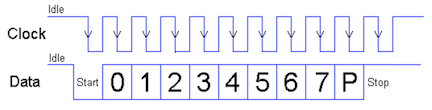
Your handler function will be called 11 times, once for each falling clock edge. Each invocation of the handler reads a single bit from the data gpio. Because each invocation has its own stack frame, you cannot use a stack local variable to store the accumulated scancode from call to call. Instead you will add that data to the ps2_device_t struct. Pass the pointer to the device struct as the aux_data argument. You can add fields to the ps2_device_t struct to store whatever information you need to track the device state between calls to the handler function.
Your assign5 version of ps2_read handled the entire scancode in one function call, using a loop for the 8 data bits and verifying the validity of the start, parity and stop bits. You now need to rework that code to operate in context of your handler function which reads a single bit at a time. It takes 11 separate calls to the handler to assemble one scancode. If the handler detects a bit in error, discard any partial scancode and re-start on new start bit as you did previously. Hint: Reviewing the finite state machine you sketched for the assign 6 style reflection may be helpful in working out the code logic.
Once your handler function can gather a scancode, you're ready to enqueue those scancodes for mainline code to retrieve.
Tip: polling versus interrupt Our reference version of the
ps2module supports both reading in polling mode and reading by interrupts; the mode is configurable via an internal switch. Your ps2 module does not support a switchable version. Instead, you will have two distinctps2modules: the originalassign5/ps2.cthat reads via polling and the reworkedassign7/ps2.cthat reads by interrupt. (You will not use assign5 version going forward; but the file is preserved in your assign5 directory if you want to review it.)
3) Use ring buffer
When the handler function successfully receives the stop bit; it needs to then safely pass the completed scancode from the interrupt handler to mainline code. The ring buffer queue shown in lecture is just the tool for the job! (see ringbuffer.h)
Create a new ring buffer queue in ps2_new and add it as a new field in the ps_device_t struct. Your handler function will enqueue the completed scancode. The ps2_read function blocks (spins) until there is a scancode available in the queue, then dequeues and returns it. ps2_read always returns a scancode, either a scancode already stored in the queue or waits for a new scancode to be enqueued.
You should now be able to run the exact same console shell application from assignment 6, and everything works as before, except this time you never miss a key. The interrupt handler pops up to process each bit, enqueueing a scancode when complete. The keyboard dequeues keys for the shell who then asks the console to update the display.
Testing and debugging
Use make test to run the test_interrupts.c test program. The starter code demonstrates some simple ways to manually test the interrupt handling of your reworked ps2 module. You might find it helpful to also re-use your assign5 tests that you used to confirm correct behavior the ps2 module and keyboard running on top of it.
Once you have confirmed the behavior of your interrupt-driven ps2 module in isolation, try make run to test ps2 in the console_interrupts_shell program.
Using the interrupt-driven ps2 module, your console should never drop another key, no matter how much processing is consumed by updating the display, cool! Note that if your redraw is on the pokey side, moderately fast typing can enqueue several key events ahead of your console's response. For assignment 7, the critical goal is to catch every key, so have patience as your console works through the backlog. For the full system, you'll want to tighten things up, read below for our advice on system responsiveness.
You now have a fully operational console running standalone on its hardware. What you have running is not too far from an Apple II computer.
Extensions
There are two extensions offered for this assignment: profiler OR mouse/paint. Successfully completing either extension earns 3 bonus credits.
Profiler
Add a profile command to your shell. A profiler is a developer tool that tracks where in the code a program is
spending its execution time.
When diagnosing how to improve the performance of a sluggish program, you first make observations and take measurements. You want to identify which code the program is spending most of its time executing, i.e. its "hot spots". These are the code sections you want to put your efforts into streamlining as they will have the biggest payoff in improving performance.
One clever way to find hot spots is a simple sampling strategy. Repeatedly interrupt the program and record a sample of which instruction the interrupted pc was executing. The probability of observing a given value of pc is proportional to the time spent executing that instruction, i.e. the more often an instruction is executed, the higher the likelihood it will be observed when sampling. Thus after having taken a good number of samples, picking out the instructions with the highest sample counts will identify the hot spots.
Implement the profile as an additional command in assign5/shell.c module. You do not need to preserve the original version or make a distinct copy for assign7, directly edit the file assign5/shell.c. In your assign7 Makefile, confirm that shell.c listed in MY_MODULE_SOURCES. Buildling assign7 will find the shell.c file in the assign5 directory (through the symbolic link we made in mylib). Test your profiler by running the interrupts_console_shell application from the assign7 directory. This is also how our grading tests work.
Use our hstimer module (header file hstimer.h) to generate timer events at an interval of ~500 microseconds. Access the value of the interrupted pc from the CSR mepc ("machine exception program counter"). You need an assembly instruction to access a CSR, but rather than add a separate .s file to the project, read up on gcc's support for "inline/extended assembly" and use that syntax to directly embed the necessary instructions into your C code.
Use malloc to create an array of counters, one for each instruction address in the text section. By knowing where the text section starts and ends (remember about the linker map file memmap.ld and the memmap.h header file), you can allocate the appropriate amount of space.
Add the command profile [on | off] to your shell commands to control the profiler. profile on resets all profile counts to zero and starts profiling. profile off stops profiling and prints the profiler results. profile with no argument shows the current status of profiling including time elapsed since start of profiling and number of samples collected so far.
The profiler results lists the 20 instructions with the highest sample counts. Each instruction is printed with its address and label (obtained from symtab) in a table like the one shown below:
profile: 35207 msecs elapsed, collected 70357 samples

  Counts  |    pc        <fn>
---------------------------------------
   28576  |  0x40003674  <gl_draw_char+288>
    6779  |  0x40003698  <gl_draw_char+324>
    3981  |  0x400032a4  <gl_clear+68>
    2562  |  0x40009b98  <timer_delay_us+44>
    2223  |  0x40006788  <rb_empty+24>
    2040  |  0x40009c10  <timer_get_ticks>
    2002  |  0x40006458  <ps2_read+44>
    1689  |  0x40009c14  <timer_get_ticks+4>
    1095  |  0x400032ac  <gl_clear+76>
    ...
Cool, you now have a profiler! Run it on your console program and learn where your hot spots are.
Tag your submit assign7-extension and be sure your commit includes the updated assign5/shell.c. In your assign7 README.md, include some of your sample profiler output and share with us what you learned from writing and using this neat tool. Were you able to use the profile information to improve your console performance?
PS/2 mouse and standalone paint application
For this extension, you'll create PS/2 mouse driver module and use it to implement a simple paint application.
Got mouse? 🐁 We keep a small stash of PS/2 mice in the Gates lab room for those working on this extension. Please do not take the mice out of the lab, they need to stay in lab for all to use. Thank you!
Communicating with a PS/2 mouse is similar to a PS/2 keyboard. First read these specifications for the PS/2 mouse and PS/2 protocol (paying particular attention to the last section labeled "Host-to-Device Communication").
Start by extending your interrupt-driven ps2 module to support the new function ps2_write. This is the symmetric operation to ps2_read that sends a scancode packet from the Pi to the device. Read the PS/2 protocol specification for how to switch between communicating from device-to-host (e.g. ps2_read) to host-to-device (e.g ps2_write). A scancode packet consists of 11 bits (start, 8 data, parity, stop) and each bit is written to the data line after observing a falling edge on the clock line.
With ps2_write in place, you're ready to create a mouse driver! The mouse module layers on the ps2 module just as keyboard does, using ps2_read (and now ps2_write) to talk to the input device. Read the header file mouse.h for the mouse interface and documentation. Create a new file mouse.c and implement the two required functions (mouse_init and mouse_read_event). mouse_init resets the mouse and enables data reporting mode. mouse_read_event calls ps2_read and converts scancodes into mouse events.
Edit the mylib/Makefile to add mouse.c to the list of LIBMANGO_MODULE_SOURCES and rebuild your library libmymango.a. Your library now supports interfacing with a mouse, neat!
Now create a new standalone paint application that uses your library. (note: this is a good preview of how to start your final project!) Make a copy of fullsystem directory and call it paint. Copy your library libmymango.a from mylib into the paint folder. Using your shiny new mouse driver, implement a simple paint application in paint/main.c. The basic features are:
- moving the mouse moves a pointer/indicator on the screen without disrupting what's previously been painted
- dragging mouse with left button down paints the pixels under the mouse
- use middle and right buttons for your choice of features (erase? change color or pen size?)
- Short clip of our paint application in action:

In your assign7
README.md, explain the features of your paint program so we will know how to test it. Tag your submission assign7-extension; be sure your commit includes both your mouse.c module and the paint folder and all its files. We can't wait to try it out!
Submitting
The deliverables for assign7-submit are:
- A reworked
ps2.cmodule that uses gpio interrupts README.md(possibly empty)
Submit your finished code by commit, tag assign7-submit, and push to remote. The steps to follow are given in the git workflow guide.
If you are submitting an extension, be sure all additional files needed for the extension are included in your tagged commit (e.g. assign5/shell.c or paint subdirectory).
Given the coincident push on finishing full system, we've intentionally scoped the assignment 7 tasks to be light compared to previous assignments. There also is no style reflection. We really hope you will submit assignment 7 by on-time deadline so you can focus attention on resolving open issues and claiming the big full system bonus!
Grading
The only grading for assignment 7 is a repeat of same ps2 module unit tests we used for assign5 now running on your interrupt-driven ps2 module.
- ps2 (interrupt-driven)
- receive bits by interrupt
- read well-formed scancode
- discard malformed (wrong start/stop/parity) and restart, timeout resynchronize
- tough for you to directly test, just try your best and we'll run under our test rig to give you results
We plan to run the grading tests right after the on-time deadline and get results out post-haste so you have the opportunity to respond and tag for re-test ahead of the full system submission.
Full system bonus
The crowning achievement on top of your hard work on the assignments is seeing your modules working together in a harmonious whole. A successful result on the system integration test earns the full system bonus , a whopping 6 bonus credits!
Full system deadline end of day Saturday The deadline for full system submit has historically been coincident with the end of the assignment grace period, but we have decided to extend by a few extra days to get those last fixes in up. Submit for full system by Sat Mar 7 11:59pm. This is also the deadline for any final revise-and-resubmit fixes for retest.
Retest: revise and resubmit to resolve issues
We are aiming for everyone to resolve all P1 issues, with added recognition for also resolving issues of lower priority.
After readying a fix and testing yourself, commit/tag/push to request retest from us. Tag assignN-retest for retest of assignN. You can tag the same commit with several retest tags if it contains fixes for more than one assignment. During the week leading up to full system deadline, we will run retest cycle nightly and update issues with new results.
Testing your system in integration
Your github issues come from unit tests run on the modules in isolation. If your code has successful results on all unit tests, this likely tracks with success on full system. However, it is possible to have discrepancies in either direction. For example, the full system can succeed despite a failure on an unit test, such as when the unit test is very thorough and surfaces a specific bug that is not exercised or detectable within the full system. Conversely, it is possible to have 100% success on all unit tests and yet still hit a failure on full system, such as a bad interaction between modules that only arises in integration or a lurking bug that was not surfaced by the coverage in the unit tests.
TLDR; both matter! Use retest to resolve issues uncovered by unit tests (whether or not they affect full system) and supplement with manual testing of full system in integration (in addition to passing unit tests). Build interrupts_console_shell with MY_MODULE_SOURCES set to include all modules. Test the console application, taking care to exercise all module features being used: key combinations, shell commands, console wrap and scroll, and so on.
System responsiveness
Aim for your console to feel responsive to the user, never dropping keys and smoothly updating the display. The design of our reference console receives typed characters one at a time from the shell and does a full redraw in response to each call to console_printf. Its good performance due to modest efforts on streamline redraw but nothing more heroic. Choosing a simple and somewhat naive approach allows you to first confirm the functionality is correct and only then go on to decide how much you need to do to get the performance you want. On the other hand, over-early optimization can saddle you with a complex design plagued with difficult bugs at unclear benefit.
Here is some opportunities to accelerate a sluggish redraw:
- Use the speed exercise from lab6 for timing code and test harness to try out options
- Inner loops are the first place to look for speed-up opportunities
(e.g. hoisting out redundant work, streamlining operations, loop unrolling), especially the inner loops within the
glmodule. With nearly two million pixels on the line, cutting just 10 or 20 instructions per pixel can save tens of millions of cycles. You will absolutely feel the difference! - Although it's best for gl draw functions to only consider on-screen pixels (i.e. not clipped), console is indifferent since it doesn't do any clipped drawing, so look elsewhere for more fruitful opportunities.
- Cacheing is a technique used widely in computer science. The basic gist is that you save a result to re-use rather than having to repeatedly recompute/refetch.
- As one example: each use of
gl_draw_charcallsfont_get_glyphto re-extract the glyph from the font bitmap. If theglmodule extracted a glyph on first use and saved it, it could use the cached version on subsequent draw operations and avoid the repeated work to extract it.
- As one example: each use of
- If you do the profiler extension, you can use it to identify the hot spots in your code, which points you to the places to focus your attention to get the most impact for your efforts!
Building libmymango.a
When all your modules are ready to go, combine them into a library for easy future use, such as for the final project. Change to the mylib directory and use make to build libmymango.a. This packages together your battle-tested code of modules into a complete library to support a bare-metal system on the Mango Pi that can be easily incorporated into any future project.
The fullsystem directory contains a project that demonstrates how to build an application using libmymango.a. You can now program your Pi like an Arduino with this high-level library you have created.
Submit full system
- Double-check that final versions of files for all modules/assignments are committed and pushed.
- In directory
mylib, make should buildlibmymango.awithout warnings or errors. - The
fullsystemdirectory should include final version oflibmymango.a. Console program should build without warnings or errors. - Tag the commit you want us to test
fullsystem-submit. If you do not have afullsystem-submittag, we will not test your code for the full system bonus. - The deadline for fullsystem submit is firm, no grace period applies.
Grading full system
We will build the fullsystem application on your libmymango.a and interactively test the complete system running with a PS/2 keyboard and HDMI monitor.
- Our test will touch on the core features of the system to confirm all is working together in integration.
- We will not re-test your individual modules to the same extent as the module unit tests, but all functionality used by shell/console must work correctly. This means, for example, your
printfmust properly print zero-padded hexadecimal numbers (which are needed forpeek), but could slip by with a minor bug in formatting a large negative value (since they are not used by the shell). - Your console should feel reasonably responsive and the screen should update in a smooth and non-glitchy manner. It doesn't need to be blindingly fast, but it should not be painfully slow. Keeping it snappy will not only delight your grader, but make testing it yourself less torturous.
A successful result on the fullsystem integrattion test earns the full system bonus of 6 credits– a big reward for a big accomplishment! You have built a complete computer system, writing your own code at every step of the way. Congratulations!
Course learning goals
Three cheers for YOU! 👏👏👏 This is your computer system, the one you built yourself from the ground up. Each line of code is there because you put it there, you know what it does, and why it is needed. We are in awe of the effort you put in to arrive here and hope you are as proud of your work as we are.
Reflecting on where you started, it has been an impressive journey. Take stock of the progress you have made on mastering these course learning goals:
✔︎ To understand how computers represent information, execute programs, and control peripherals
- Binary and hexadecimal number systems, machine encoding of instructions
- Memory layout, pointers, arrays, structs
- RISC-V assembly, use of registers, instruction control flow
- Runtime use of stack and heap memory
- Memory-mapped I/O to access to peripherals, device drivers (keyboard, display)
- Interrupts, simple multi-processing
✔︎ To master command-line programming tools and the C programming language
- Build tools (assembler, compiler, linker, make, bootloader)
- Implementation of standard C library functions (strings, printf, malloc, graphics)
- Strategies for testing and debugging code, using gdb
- Establishing a productive and effective programming workflow
Bring these skills into the final project, mix with your creativity and initiative, and something fabulous will surely result. We're looking forward to it!
